


The CAT App (Courses and Teachers Application) is a University-wide integration tool that ensures consistent and accurate data across key ANU systems—including the Student Administration System (SAS), Timetabling, and Programs and Courses.
It supports the continuous improvement of course management processes and scales alongside ANU’s evolving Learning Ecosystem.
What is CAT App for?
For Course Convenors, the CAT App is the primary platform for managing Canvas Course users, allowing seamless integration between official enrolment data and Canvas access.
CAT App provides a streamlined and user-friendly interface to manage Canvas user roles and maintain system-wide data integrity.
Key Features
- Add or remove users from your Canvas Course(s).
- Assign roles such as Lecturer, Tutor, or Course Convenor.
- Changes made in the CAT App reflect in Canvas almost instantly.
- Official enrolment data is automatically synced from SAS.
How to Identify and Manage Canvas Course Users
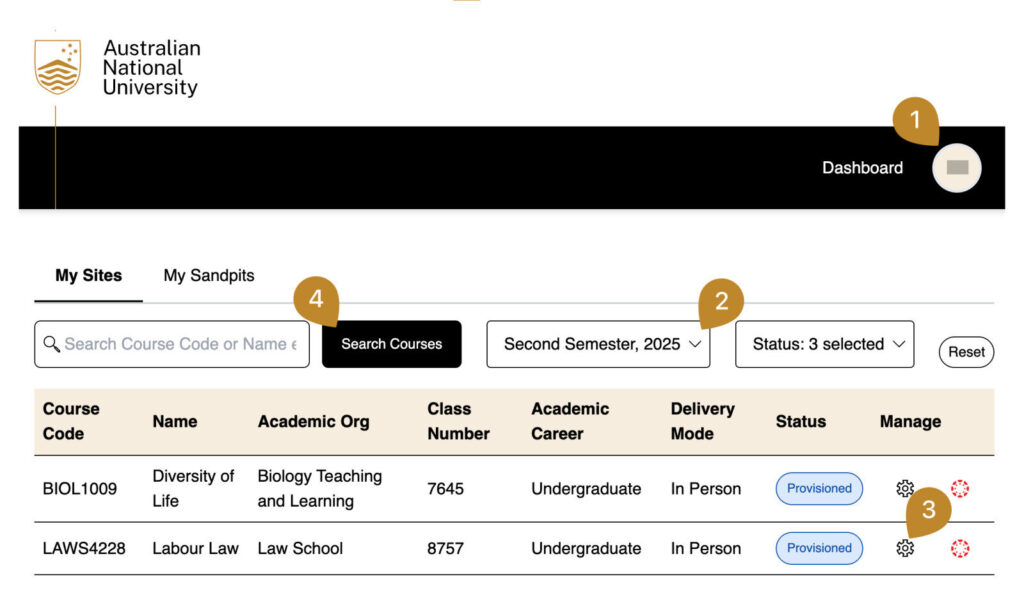
- Sign in to the CAT App using your ANU UID. You’ll land on your Dashboard.
- Select the appropriate session, e.g. Second Semester, 2025.
- Click the cogwheel icon under Manage for the course you wish to edit.
- (Optional) Use the Search Courses bar if you manage many courses. You can search by course code or name (partial names are accepted).
Refer to the first image for visual guidance.
Managing Users and Roles in Canvas
Once inside the Canvas Course Detail page:
To Add a User:
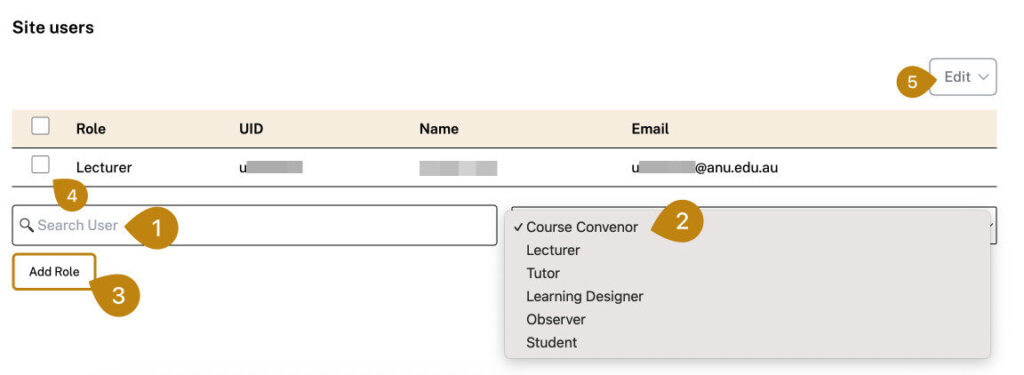
- Enter the UID or name in the Search User field.
- Select the relevant Canvas Role from the dropdown (e.g. Course Convenor, Tutor, Lecturer, etc.).
- Click Add Role.
To Remove a User:
- Tick the checkbox next to the user’s name.
- Click Edit and select Delete.
Note: To change a user’s role, first remove them, then re-add them with the new role.
Refer to the second image for a visual example of this process.